
Managing Recheck Certified for your team
Before you start: you'll need a Recheck business account with your sales team(s) added. If you haven't set that up yet, please see this guide.
Once you've set up your business account:
Communicate the Certified rollout to your team
Before reps are asked to complete the certification process, tell them:
What Recheck Certified is and why your organization is adopting it
What the deadline is for becoming Recheck Certified
Where to go to get started: recheck.co/account/get-certified
Where to get help: point them to this guide for a full walkthrough
Want to automatically prompt all reps on your Recheck Team to get certified? Enable "Require Recheck Certification" in your Team Settings.
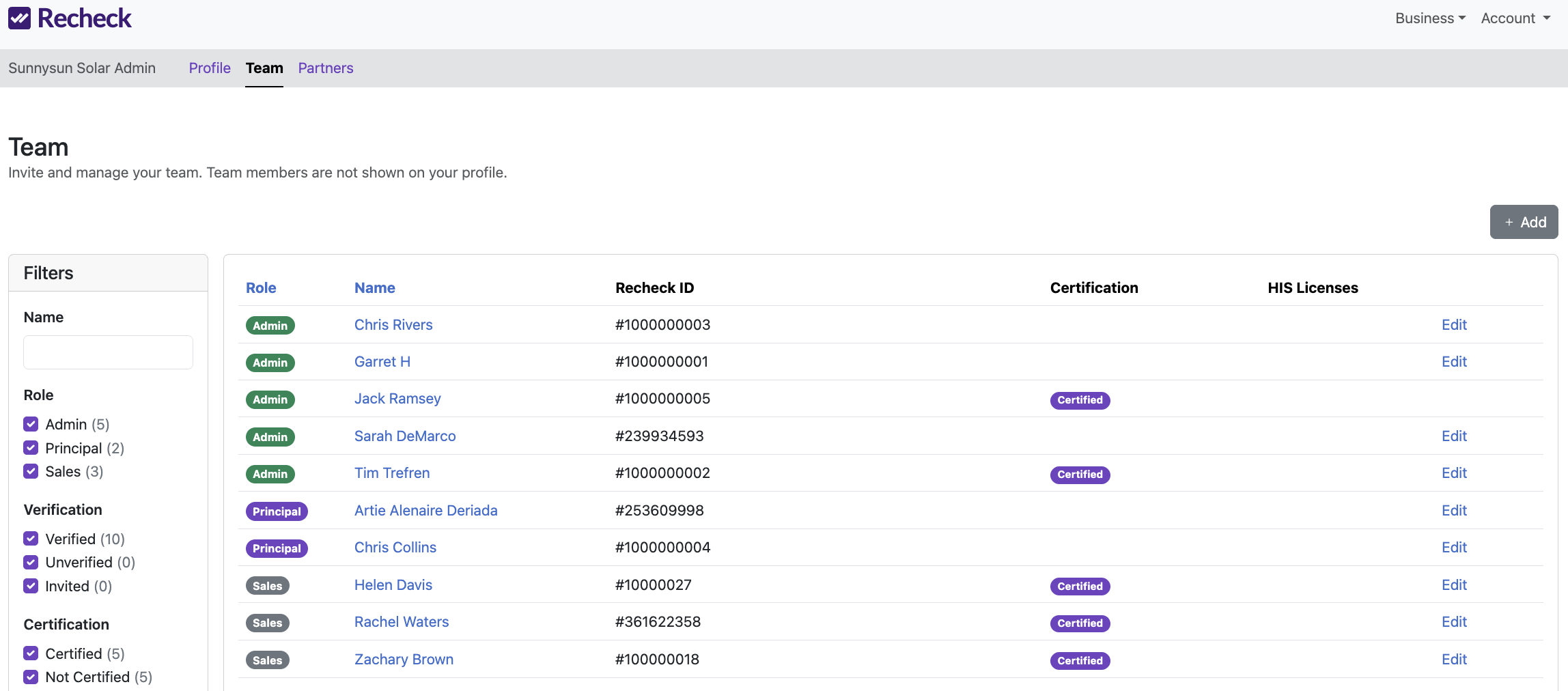
Check Certification status in your 'Team' view
Each of your linked team members will be listed with their role, Recheck ID, Certification status, and HIS license information pulled from their Recheck account.
Reps who have completed all certification steps display a purple Certified badge. A blank column means the rep is not yet Certified.
Use the Certification filter in the left sidebar to quickly see who's Certified and who isn't - helpful for tracking rollout progress across your team.
Note: additional account admin functionality will be coming soon. Please reach out to support@recheck.co for help or to share feedback.